


Implementing Remote CCTV Access Using Ngrok Tunnel for ESP32-CAM Monitoring
 View
View
While local Wi-Fi streaming is sufficient for internal monitoring, remote access becomes essential when surveillance needs to be accessed outside the local network. In this project, remote monitoring was implemented using Ngrok tunneling to expose the ESP32-CAM stream securely over the internet.
This approach eliminates the need for complex router port forwarding configuration and allows quick deployment in dynamic IP environments.
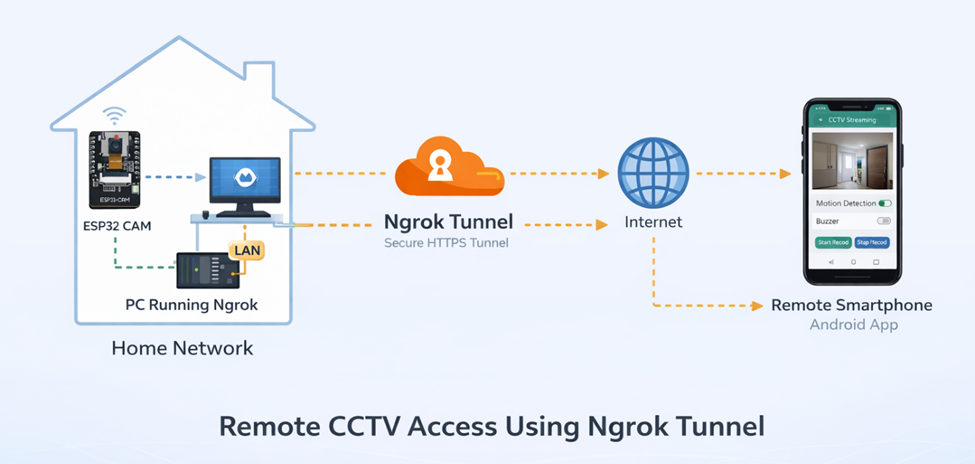
Local Streaming Architecture
By default, ESP32-CAM hosts a local HTTP video stream accessible via:
http://192.168.x.x:81
The IP address is obtained from the Android setup interface.
In local mode:
- Device and smartphone must be on the same Wi-Fi network
- Local Host option remains enabled
- Video streaming occurs via internal LAN
However, this limits access to the same network.
Remote Access Challenge
Problems with direct remote access:
- Dynamic public IP from ISP
- Router port forwarding complexity
- Security risk when exposing raw ports
- Firewall restrictions
To solve this, Ngrok was used as a secure HTTP tunnel.
Ngrok Tunneling Configuration
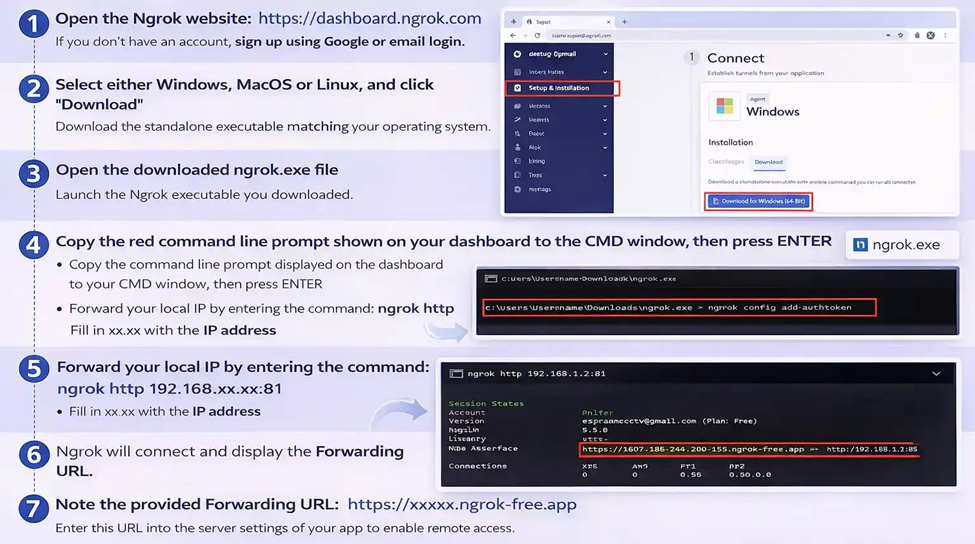
The setup process follows the procedure shown:
- Create an Ngrok account
- Download ngrok executable
- Authenticate using authtoken
- Run command:
ngrok http 192.168.xx.xx:81
This creates a secure public forwarding URL.
Once active, Ngrok generates a public HTTPS address such as:
https://xxxx-xx-xx-xx.ngrok.io
This URL is then entered into the Android app under the server configuration menu.
Switching from Local to Online Mode
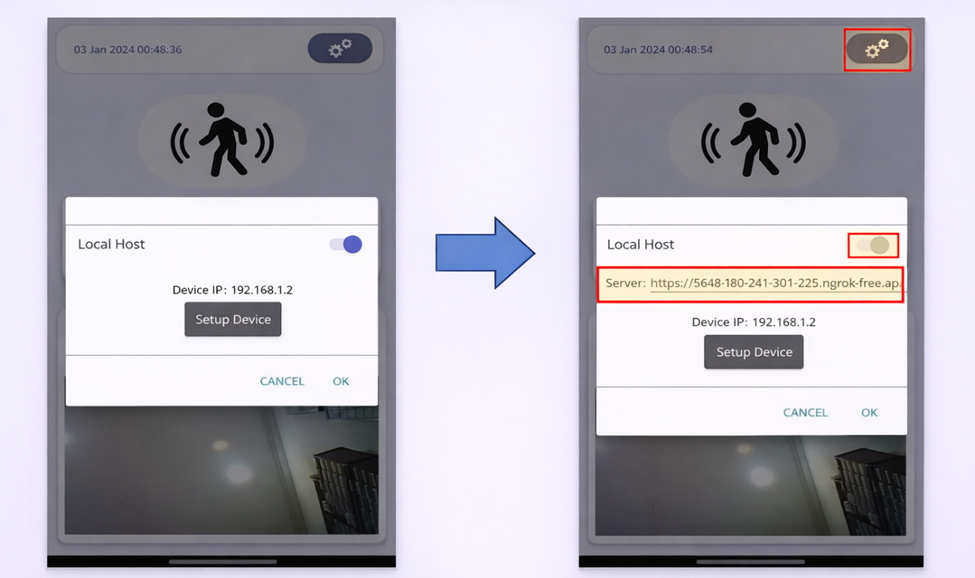
In the Android interface:
- Disable Local Host
- Enter Ngrok forwarding URL
- Save configuration
- Restart streaming
After this, the CCTV stream becomes accessible externally.
The device and PC running Ngrok must be on the same network.
Security Considerations
Although Ngrok simplifies remote access, several precautions are necessary:
- Use HTTPS forwarding
- Avoid publishing raw IP address
- Protect Firebase rules properly
- Disable open read/write access in production
- Use strong Wi-Fi credentials
- Limit Ngrok session exposure
For industrial deployment, dedicated cloud hosting or reverse proxy services would be recommended.
Network Stability and Performance
Key implementation considerations:
- Maintain stable LAN connection
- Ensure sufficient upload bandwidth
- Avoid excessive frame resolution
- Monitor latency during streaming
- Restart Ngrok tunnel if session expires
Ngrok free sessions typically reset periodically, so persistent monitoring may require automation.
Engineering Insight
This remote monitoring architecture demonstrates how embedded devices can extend beyond LAN constraints using tunneling services.
By integrating:
- ESP32-CAM local HTTP server
- Ngrok secure forwarding
- Android remote configuration
- Firebase synchronization
The system becomes a flexible IoT surveillance platform suitable for home, laboratory, and small industrial use.
Conclusion
Implementing Ngrok-based tunneling transforms a local ESP32-CAM CCTV system into a remotely accessible surveillance device without complex router configuration.
This approach provides a fast deployment solution for remote monitoring while maintaining modular firmware architecture between streaming, motion detection, and cloud synchronization.
#IoTProject#
#ESP32CAM#
#NgrokTunnel#
#RemoteAccess#
#EmbeddedNetworking#
#SmartCCTV#
#HTTPSTunnel#
#WiFiSecurity#
#AndroidMonitoring#
 #IoTProject#
#ESP32CAM#
#NgrokTunnel#
#RemoteAccess#
#EmbeddedNetworking#
#SmartCCTV#
#HTTPSTunnel#
#WiFiSecurity#
#AndroidMonitoring#
#IoTProject#
#ESP32CAM#
#NgrokTunnel#
#RemoteAccess#
#EmbeddedNetworking#
#SmartCCTV#
#HTTPSTunnel#
#WiFiSecurity#
#AndroidMonitoring#
Sign In Or Register Comment after
No comments yet. Be the first to comment!